
Every feature a gaming venue needs, in one place.
Fill your quiet hours, turn walk ins into regulars, run tournament nights and close every shift with numbers that add up. Here is everything Anycafe does for cyber cafes, LAN centers, esports arenas and gaming lounges.
Sell more of every hour.
Price time the way players want to buy it, and make sure the drink next to the keyboard ends up on the bill.
Zone pricing
Standard PCs, VIP rooms, consoles and sim rigs each earn their own hourly rate.
Learn morePackages and happy hours
Three and five hour packs for regulars, bonus time for quiet afternoons.
Monthly memberships
A lower rate on every hour for members, steady income every month for you.
Console pricing per player
Console sessions priced for two, three or four players, with no math at the counter.
Learn morePOS, bar and open tabs
Drinks, food and time on one bill, with tabs that stay open on a table or a PC.
Learn moreMargin calculator
Enter the invoice price and see your margin before you set the shelf price.
Gift vouchers
Vouchers for birthdays and holidays, redeemed on any PC or at the counter.
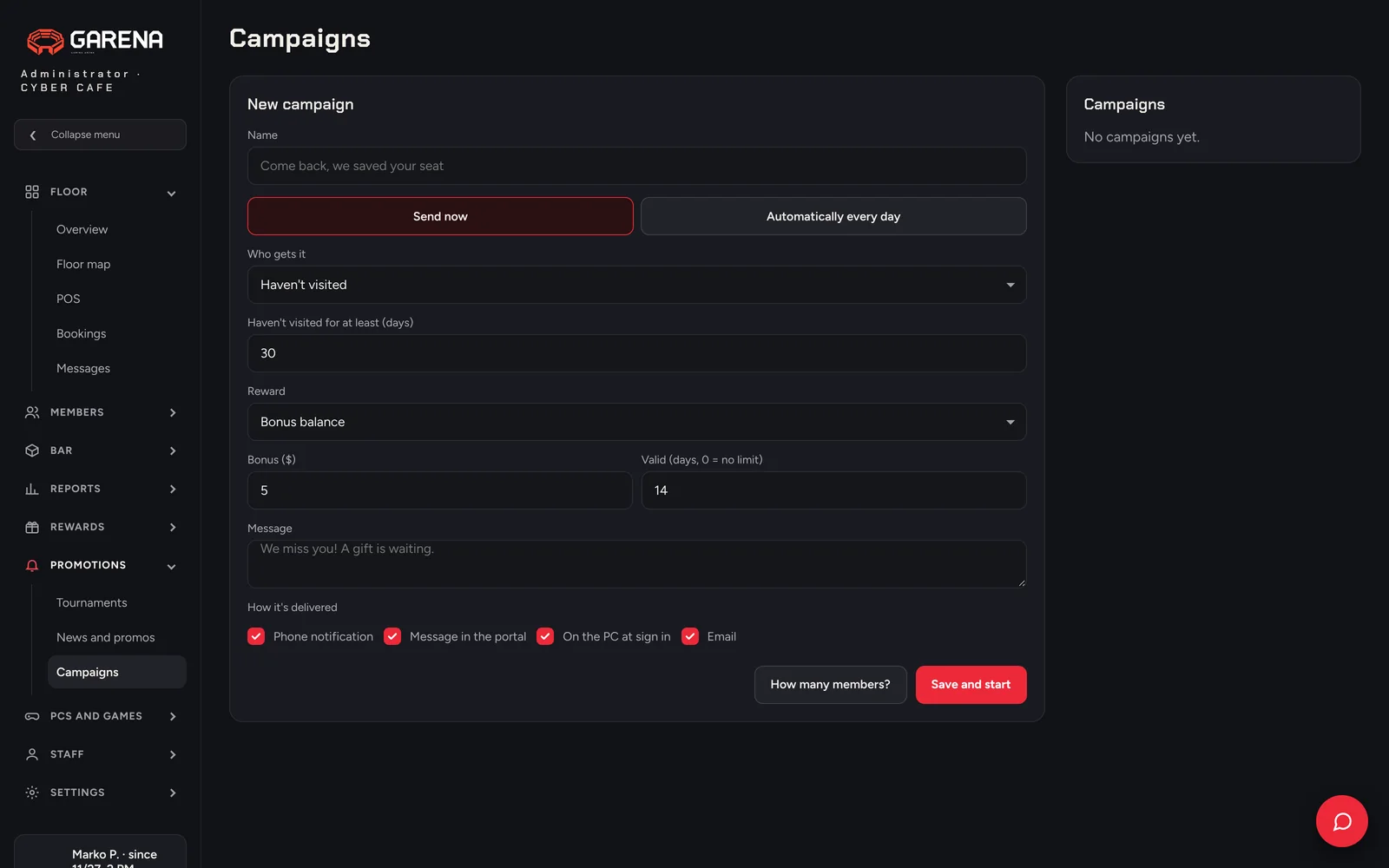
Win-back campaigns that run on their own.
Pick who should get the offer, like members who have not visited in 30 days or your biggest spenders, choose the reward and send it now or automatically every day. Players get it on their phone, in the portal, on the PC when they sign in and by email.
- Target by days away, money spent or hours played
- Bonus balance, free play time or a top up bonus
- Rewards that expire, so players come back soon
- See how many members a campaign reaches before you send it
Give players a reason to come back tomorrow.
Progress they can see, prizes they can win and friends who are already there.
Points and rewards shop
Points on every hour and every dollar, spent on time, drinks or prizes.
Learn moreDaily bonus and vault
A seven day login streak, plus a rewards vault opened with keys earned by visiting.
Learn moreDaily, weekly and monthly missions
Small goals like two hours today or three wins this week keep sessions going.
Levels, ranks and perks
Ranks with real perks, and XP that slowly fades for players who stop coming.
Game boards on your TV
Counter-Strike 2, VALORANT, League of Legends and Dota 2 boards by play time, wins or kills.
Learn moreSquads, teams and a feed
Players form squads for tonight and real teams with a captain in the player portal.
Learn moreBirthday rewards
A gift on their birthday that brings them in to celebrate.
Tournaments without the spreadsheet.
Everything you need to run a weekly cup or a monthly league, from sign ups to the final payout.
Team sign ups on the phone
Captains pick the lineup and sign up the team in the player portal.
Learn moreCheck in and requirements
A check in window, a minimum level and seeding your way.
Entry fees in points
Charged at sign up and refunded if the team withdraws.
Automatic prizes
Points and bonus paid to every player in the lineup when it ends.
Your TV becomes the main stage.
The tournament screen rotates between live matches, brackets, group tables and sign ups, with a QR code teams scan to register. Players watch it between rounds, and everyone in the room knows what is coming next.
- Upper and lower brackets, groups and results
- Prizes and free slots while sign ups are open
- Works in any TV browser, no sign in needed
See every seat without walking the room.
Know what is happening on every PC, console and sim rig, and fix problems before a player walks up to the desk.
Remote screen view
Watch any PC’s screen live from the desk, and take control when a player needs help.
Alerts on your phone
A push alert when a PC goes offline, runs too hot or stock runs low.
PC diagnostics
Temperatures, connection status and a list of what needs attention.
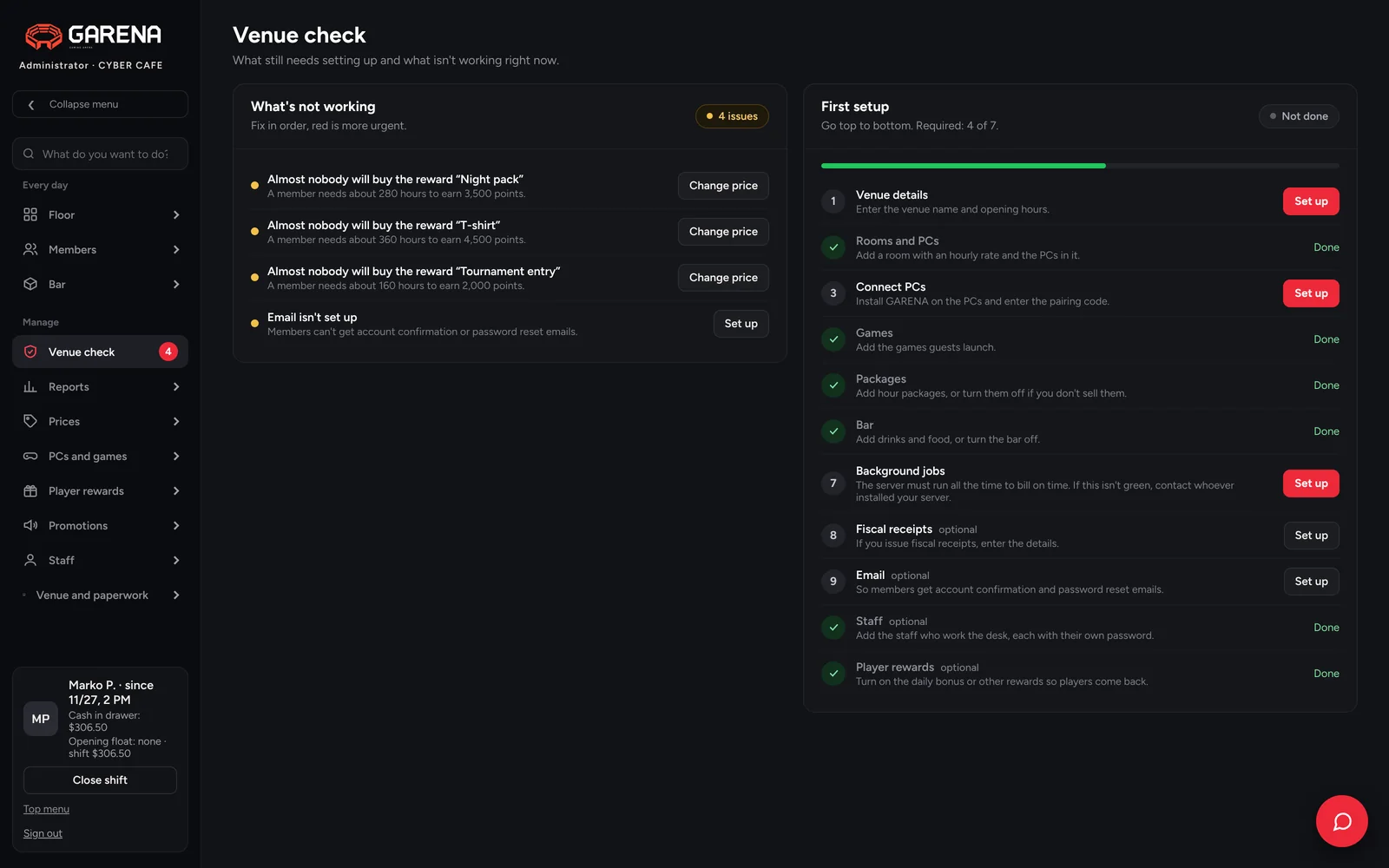
Venue check
A checklist of what is not set up yet and what is broken right now.
Game library
Covers, age ratings and launch settings, with games limited to sim rigs or PCs.
Learn moreLock, restart, shut down
Act on one PC or the whole room in one click.
Know what is missing before your players do.
The venue check walks you through first setup, from rooms and PCs to prices, games and staff, then keeps watching. If backups stop, email is not set up or a reward costs more points than anyone can earn, it tells you what to fix and in what order.
- A step by step setup list for new venues
- Problems sorted by how urgent they are
- One click from each problem to the fix
Clean numbers at the end of every shift.
Honest drawers, clear roles and reports your accountant will actually like.
Roles and permissions
Cashiers, managers and technicians see only what they need.
Staff rota
Plan the week, copy last week in one click and compare planned with worked hours.
Shift close
Every shift starts with a float and ends with a counted drawer.
Audit log
Every staff action on record, with who did it and when.
Refunds with a reason
Refund a sale and keep the reason on file.
Balance payouts
Pay out a member’s balance with a statement for your records.
Stocktakes and suppliers
Stock in, write offs, stocktakes and a bar log for every shift.
Reports and exports
Revenue, occupancy and top games, with CSV export.
Fiscal receipt printing is supported where your country requires it.
Grow to more venues and sleep well.
Multiple locations
Several venues in one install, each with its own floor, prices and reports.
Learn moreAdmin app on your phone
The admin panel installs on your phone, so takings and alerts go where you go.
Hosted with health checks
Each venue on its own instance, checked about once a minute.
Backups
Automatic backups, plus one click before every update.
Every module included
The bar, bookings, tournaments, the portal and more, all in one price per PC.
Learn moreRun it yourself
Prefer your own hardware? Run Anycafe on your own Linux server for a one time $995.
Learn moreFeature questions
What features does Anycafe include?
Time billing with zone pricing, packages and memberships, POS and bar stock, rewards, missions and ranks, tournaments with brackets, leaderboards, win-back campaigns, bookings, a PC client, a player portal, staff roles and shifts, reports, remote screen view, alerts and cloud hosting with backups.
Can I run esports tournaments in Anycafe?
Yes. Single or double elimination, groups with playoffs or a league, with team sign ups in the player portal, map veto, captain score reports, a live TV screen and automatic prize payouts.
Can I show leaderboards on a TV?
Yes. Show weekly or monthly boards for Counter-Strike 2, VALORANT, League of Legends and Dota 2, ranked by play time, points or match wins and kills where the game supports it.
Can I send offers to members who stopped coming?
Yes. Win-back campaigns pick members by days away, money spent or hours played, and send bonus balance, free time or a top up bonus, once or automatically every day.
How do I know my venue is set up correctly?
The venue check lists what still needs setting up and what is not working right now, from missing PCs and prices to email and backups, in order of how urgent it is.
Can I see a player's screen from the front desk?
Yes. Open any PC from the desk to see its screen live, and take control when a player needs help.
Will I know when a PC breaks or stock runs low?
Yes. Anycafe alerts your phone when a PC goes offline, a PC runs too hot or a product drops below its minimum stock.
See every feature working on your floor.
Book a demo and we will walk through the features that matter for your venue, using your own zones and prices.